
Official gameplay loop
Build a car → add weapons and defenses → crush zombie waves → earn cash → upgrade the build.
From lobby to first drive
- Roll the needed categoriesThe captured vehicle selector includes Blocks, Engines, Wheels and Fuels. Supports use their own Roll prompt. See the roll guide.
- Open Build modeThe captured interface labels B as Build or Return. Vehicle and Weapons have separate inventory tabs.
- Make a controllable vehicleUse a Driver Seat with an engine, fuel and wheels from your inventory. The capture proves these part classes, but not a universal best layout.
- Correct placement errorsSelect the misplaced part and use Q Delete. No undo prompt was captured. See all observed controls.
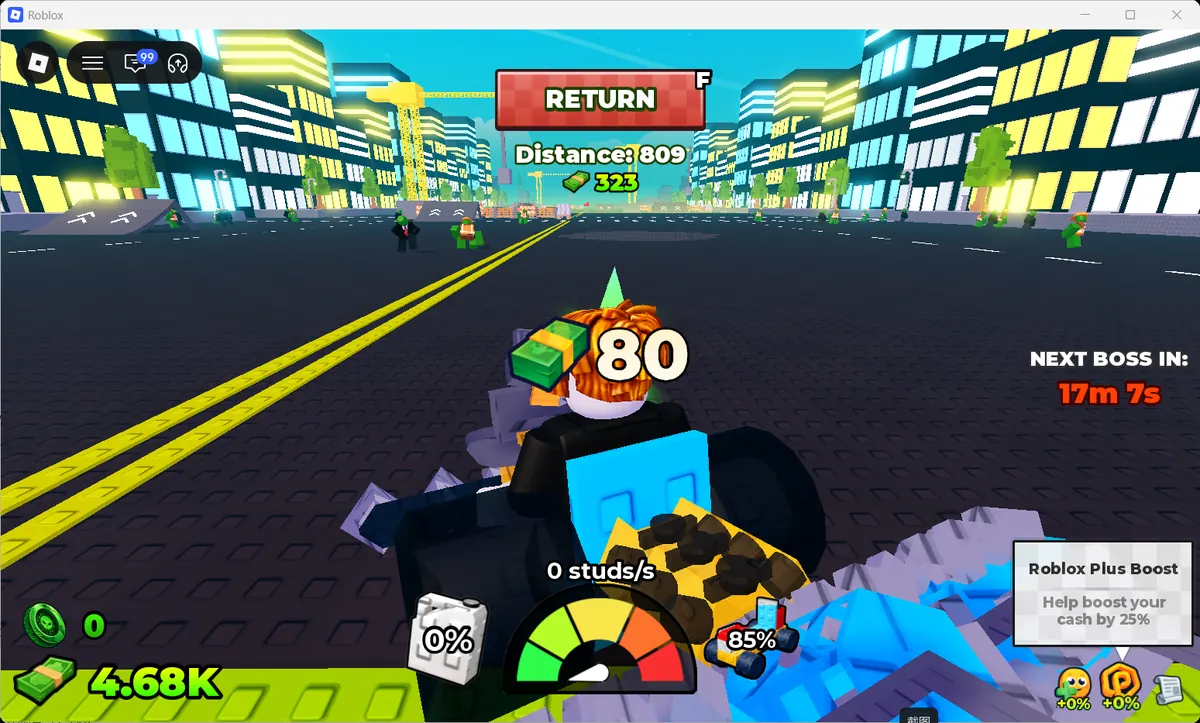
- Drive and record the HUDF enters or returns from driving. The HUD shows distance, cash, speed, vehicle status and fuel.
What the captured drive proves
Three checkpoints—218 → 87, 731 → 292 and 809 → 323—match floor(distance × 0.4) in one zero-bonus observation set. Use the distance cash calculator to reproduce it, and retest after updates or with a boost.
A simple decision tree
| Observed problem | Test next | Tool |
|---|---|---|
| Many zombies reach the car | Weapon damage, fire rate or targeting | DPS calculator |
| Vehicle status falls quickly | Durability, layout and contact damage | Wave simulator |
| Fuel reaches zero first | Fuel parts and route distance | Parts database |
| Upgrade feels slow to repay | Comparable distance and other cash | ROI calculator |
Early mistakes to avoid
- Changing weapon, vehicle and route together, then guessing what helped.
- Treating a rolled offer as a purchased item.
- Calling a displayed 1 in N label a guaranteed probability formula.
- Using a guide for the older, similarly named Roblox game.
Is there a verified free complete vehicle?
No captured screen proves a universal free complete vehicle. The observed player had parts in Build inventory, but the images do not prove how every part was acquired.
What should I upgrade first?
Upgrade the limit visible in the HUD or run: Support slots, damage pressure, vehicle status or fuel range.
How do I return a misplaced part?
Select the placed part and use Q Delete; B is shown for Return. No undo state was captured.